Python学习笔记(七)——数据可视化

1 根据地理编码数据创建 Google 地图应用
PythonLearningNote7_1

注意:例中所用所有完整代码可在这里查看

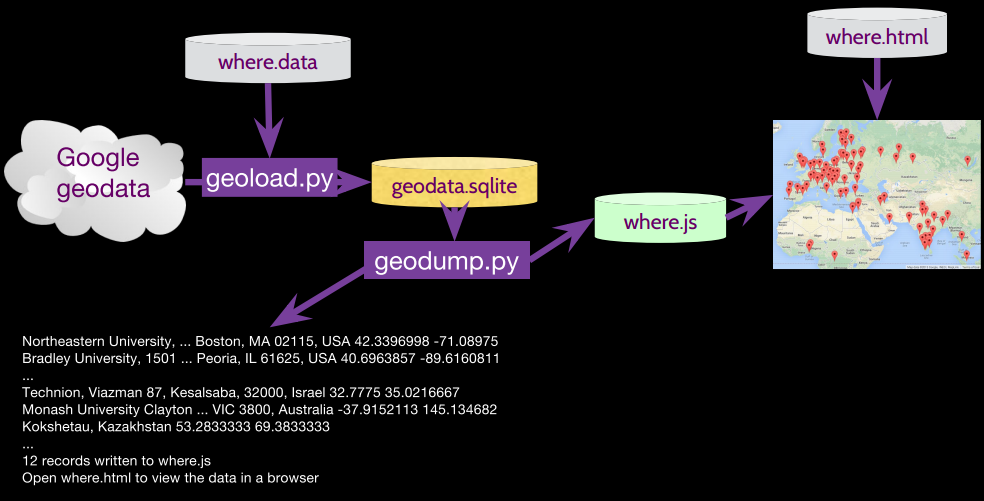
where.data:存放需要检索的地理位置
geoload.py:将地理位置与通过检索得到的数据信息放入数据库 geodata.sqlite
geodump.py:从数据库 geodata.sqlite 中读取数据并将 GPS 坐标和地名以 JSON 格式写入 where.js

geoload.py:

1
2
3
4
5
6
7
8
9
10
11
12
13
14
15
16
17
18
19
20
21
22
23
24
25
26
27
28
29
30
31
32
33
34
35
36
37
38
39
40
41
42
43
44
45
46
47
48
49
50
51
52
53
54
55
56
57
58
59
import urllib
import sqlite3
import json
import time
import ssl

# If you are in China use this URL:
# serviceurl = "http://maps.google.cn/maps/api/geocode/json?"
serviceurl = "http://maps.googleapis.com/maps/api/geocode/json?"

# Deal with SSL certificate anomalies Python > 2.7
# scontext = ssl.SSLContext(ssl.PROTOCOL_TLSv1)
scontext = None

conn = sqlite3.connect('geodata.sqlite')
cur = conn.cursor()

cur.execute('''
CREATE TABLE IF NOT EXISTS Locations (address TEXT, geodata TEXT)''')

fh = open("where.data")
count = 0
for line in fh:
if count > 200 : break
address = line.strip() # 移除字符串首尾的空白
print ''
cur.execute("SELECT geodata FROM Locations WHERE address= ?", (buffer(address), )) # buffer()用来转换Unicode

try:
data = cur.fetchone()[0]
print "Found in database ",address
continue
except:
pass # 跳出循环

print 'Resolving', address
url = serviceurl + urllib.urlencode({"sensor":"false", "address": address})
print 'Retrieving', url
uh = urllib.urlopen(url, context=scontext)
data = uh.read()
print 'Retrieved',len(data),'characters',data[:20].replace('\n',' ')
count = count + 1
try:
js = json.loads(str(data))
# print js # We print in case unicode causes an error
except:
continue

if 'status' not in js or (js['status'] != 'OK' and js['status'] != 'ZERO_RESULTS') :
print '==== Failure To Retrieve ===='
print data
break

cur.execute('''INSERT INTO Locations (address, geodata)
VALUES ( ?, ? )''', ( buffer(address),buffer(data) ) )
conn.commit()
time.sleep(1)

print "Run geodump.py to read the data from the database so you can visualize it on a map."

geodump.py:

1
2
3
4
5
6
7
8
9
10
11
12
13
14
15
16
17
18
19
20
21
22
23
24
25
26
27
28
29
30
31
32
33
34
35
36
37
38
import sqlite3
import json
import codecs

conn = sqlite3.connect('geodata.sqlite')
cur = conn.cursor()

cur.execute('SELECT * FROM Locations')
fhand = codecs.open('where.js','w', "utf-8") # 用codecs提供的open方法来指定打开的文件的语言编码,它会在读取的时候自动转换为内部unicode
fhand.write("myData = [\n")
count = 0
for row in cur :
data = str(row[1])
try: js = json.loads(str(data))
except: continue

if not('status' in js and js['status'] == 'OK') : continue

lat = js["results"][0]["geometry"]["location"]["lat"]
lng = js["results"][0]["geometry"]["location"]["lng"]
if lat == 0 or lng == 0 : continue
where = js['results'][0]['formatted_address']
where = where.replace("'","")
try :
print where, lat, lng

count = count + 1
if count > 1 : fhand.write(",\n")
output = "["+str(lat)+","+str(lng)+", '"+where+"']"
fhand.write(output)
except:
continue

fhand.write("\n];\n")
cur.close()
fhand.close()
print count, "records written to where.js"
print "Open where.html to view the data in a browser"

2 PageRank[^1]

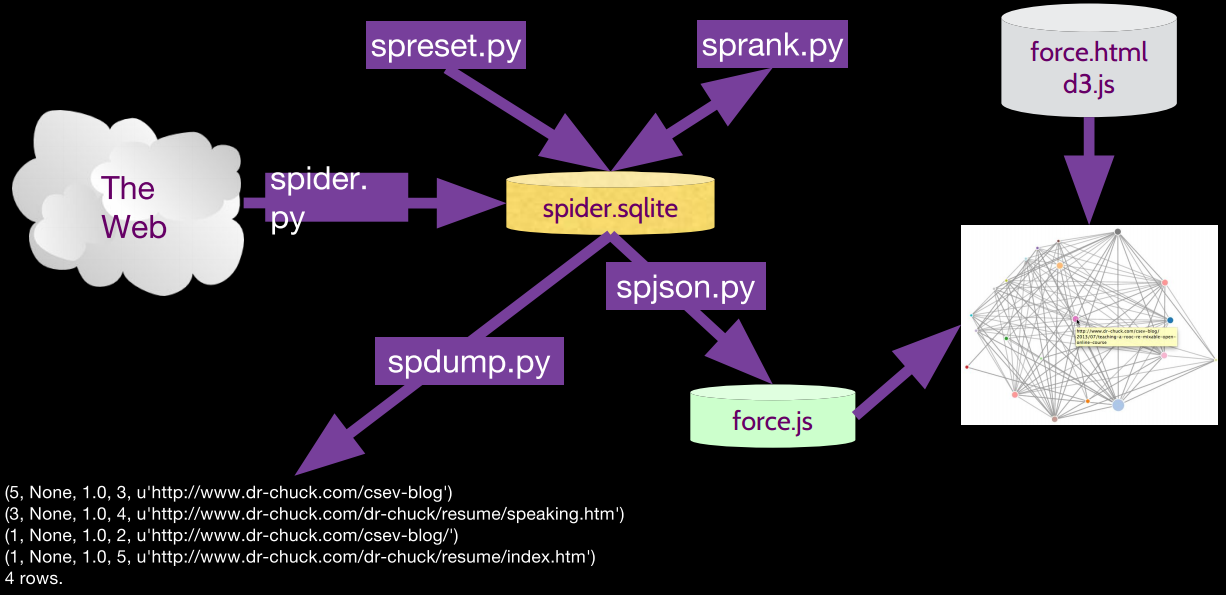
PythonLearningNote7_2

PythonLearningNote7_4
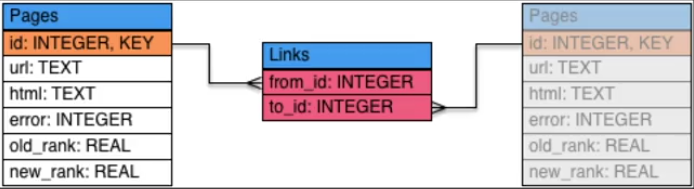
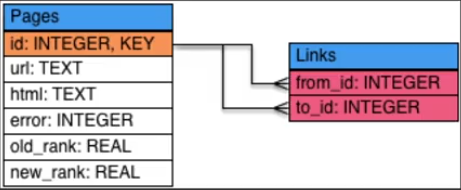
Pages之间是多对多的关系(如果 a 页面中有 b 页面的链接,那么 a 页面是 from_page,b 页面是 to_page),所以所以中间添加一张连接表

简化后的表:
PythonLearningNote7_3

[^1]: Google 创始人 Larry Page 和 Sergy Brin 关于 PageRank 算法早期思想的论文 《The Anatomy of a Large-Scale Hypertextual Web Search Engine》http://infolab.stanford.edu/~backrub/google.html